

School Management Software Comparison: Gradelink vs AdminPlus
Gradelink is a comprehensive, user-friendly student information system (SIS) built with private and faith-based schools in mind. Designed to simplify school management, Gradelink offers powerful features to streamline administrative tasks, improve communication between staff and families, and support student success—all in one easy-to-use platform.
One of Gradelink’s standout benefits is its exceptional customer support. From initial setup to ongoing use, schools are assigned a dedicated representative who provides personalized assistance every step of the way. Schools can get fully set up and running in as little as 10 days, minimizing downtime and ensuring a smooth transition.
Gradelink is intuitive and budget-friendly, making it an ideal choice for schools of all sizes. Its ease of use reduces training time for staff, while automated processes like attendance tracking, grade reporting, and enrollment management save countless hours. Gradelink’s affordability ensures schools can access top-tier tools without compromising quality or service.
Whether managing a small private school or a larger institution, Gradelink empowers your team to focus on what matters most—educating students and building a strong school community.
Let’s take a deeper look at how Gradelink’s ease of use and efficiency compare to Rediker Administrator’s Plus, since, as it’s being phased out, many schools are looking for alternatives to AdminPlus.
Login and Navigation
Gradelink
- One login page. You can log in using Google, thumb or face ID (on mobile), or a username and password.
- Navigation is straightforward, with minimal nested menus, making it easier to find what you need.
- Users appreciate its ease of use, stating that “our teachers are all able to easily use Gradelink.” (Capterra)
AdminPlus
- Users often report that logging in and navigating takes multiple steps due to separate portals for different functions.
- Menus are more complicated, with deeper navigation layers, which can make it harder to find settings quickly.
- While comprehensive, the interface can be overwhelming for new users, potentially requiring additional training. (Capterra)
- Some users have reported that the system is “ugly, clumsy, unintuitive, extremely difficult to use.”
- Some users have expressed challenges, mentioning that “after 15 years, we’re shelving Rediker and moving to a new SIS.”
Customer Support
Gradelink
- Highly praised for its responsive customer service, with users noting that “customer service is extremely helpful and always pleasant.”
AdminPlus
- Offers customer support, but experiences vary among users.
Pricing
Gradelink
- Affordable and transparent pricing, starting at $117 per month. Anyone can fill out a form to download a quick quote here.
AdminPlus
- Pricing details are less transparent.
Entering and Editing Grades
Gradelink
- Teachers can enter grades with just two or three clicks from the dashboard.
- Bulk grade entry is quick and seamless.
- One-click Google Classroom integration is available. Read more.
AdminPlus
- Grade entry often takes several clicks as teachers must navigate multiple screens.
- Manual saving is required, increasing the chance of lost data.
- Bulk grade entry is available but less intuitive, requiring more setup.
- Google Classroom integration is more complex and requires many steps.
Generating Report Cards
Gradelink
- Report cards are generated and printed with three or four clicks from the admin panel. Download examples.
- Customization is simple, with templates and free support.
AdminPlus
- Generating report cards takes five or more clicks, with more manual adjustments required.
- Customization is less user-friendly, requiring deeper menu navigation.
Managing Student Enrollment
Gradelink
- EnrollMe, Gradelink’s online enrollment feature, lets parents submit applications directly into the system.
- Admins can approve and process applications in two or three clicks.
AdminPlus
- The enrollment process involves a significant amount of manual work, requiring data to be entered across multiple pages.
- The process often takes several clicks and can be time-consuming.
Sending Parent Communications
Gradelink
- SmartSend Pro provides easy communication in two clicks, with built-in email, text, and voice messaging.
- Emails can be scheduled, and delivery tracking is built-in.
AdminPlus
- Communication tools are available but require more steps to create messages.
- Scheduling and tracking features are less streamlined.
Ratings and Reviews
| Ratings from G2 | Gradelink SIS | Rediker AdminPlus |
| Overall Rating |  4.7 4.7 |
 3.7 3.7 |
| Meets Requirements |  |
 |
| Ease of Use | 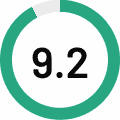 |
 |
| Ease of Setup |  |
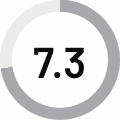 |
| Ease of Admin | |
 |
| Quality of Support |  |
 |
| Good Business Partner | |
 |
| Product Direction |  |
 |
Gradelink Customer Reviews
Gradelink has helped us improve student information gathering and reporting, billing, attendance, and so much more. They are always so quick to respond to any of our questions and help us figure out the best ways to utilize Gradelink to meet our needs. Absolutely some of the best customer service around.
—Jodie M., Administrative Assistant
Overall, it has been a great tool for our school. It is a fantastic resource for myself, my staff and my parents. Every day I learn something new. That is amazing.
—Jillie P., Executive Assistant
Our school is new to Gradelink this year and, so far, the process, platform, training and customer support have been wonderful.
—Amy D.
Gradelink’s user-friendly interface and comprehensive features have streamlined our administrative tasks, enhancing efficiency across the board.
—Jung K., Principal
AdminPlus Customer Reviews
Training is terrible and comes at a high price. Further, the system is extremely clunky and outdated. We were recently notified that we'd need to pay a $1,500 professional services fee to upgrade our system to the latest version Rediker offers because they will be doing no additional/further updates to the version we have. That said, even in demonstrating the upgraded version, we ran into bugs and other nuisances.
—Destiny E., Marketing Communications Director
Administrator's Plus felt clunky for a modern web-based product. While the backend was powerful, the front end, especially for the accompanying teacher and parent products, was not inviting or intuitive.
—Director of Children’s Ministires
Tasks are cumbersome and involve multiple steps. The Parent Portal provides valuable information but is difficult to access, slow to respond and not very user friendly.
—Michelle O., Development Officer
Rediker looks like it was developed in the ’90s and not updated much since. Can be very clunky to navigate.
—Reviewer on G2
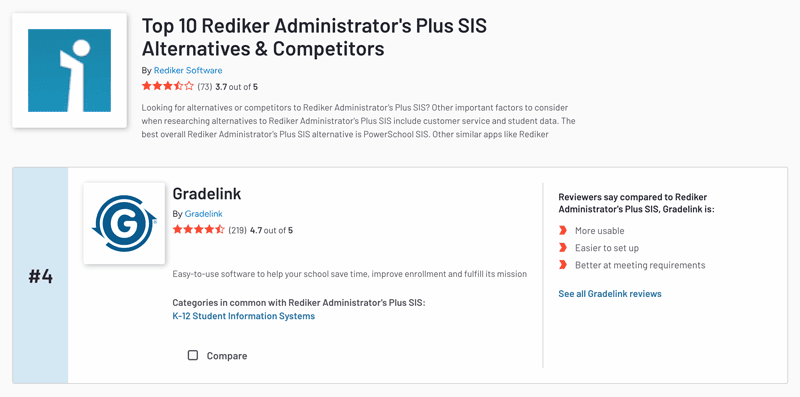
G2 ranks Gradelink as one of the top alternatives to Rediker AdminPlus.
Conclusion
Gradelink is designed to minimize clicks and simplify navigation, making it easier for teachers, admins, and parents to complete tasks quickly. Rediker AdminPlus, while functional, often requires more steps and deeper menu navigation to accomplish the same tasks, leading to a steeper learning curve and wasted time.
For schools looking for an intuitive, time-saving system, Gradelink is the better choice. To see what your school can accomplish with Gradelink, watch a free demo.