

School Management Software Comparison: Gradelink vs Alma
When choosing a school management system (SMS), it’s essential to pick one that not only handles your academic and administrative tasks but also works well with the tools your school already uses. Gradelink and Alma are two popular options. Both have strong features, but their differences can have a significant impact on staff, teachers, and parents.
This blog post considers the following aspects of Alma and Gradelink student information systems
- Parent Portal Experience
- Communication
- Medical
- Data Export and Reporting
- Financial Module
Student and Parent Portal Experience
Gradelink provides a dedicated Student/Parent mobile app available on both iOS and Android. The app has a 4.8-star rating on the App Store and is widely praised for helping families stay on top of grades and assignments. In addition, Gradelink provides a mobile-friendly browser portal, giving parents and students flexibility in accessing information.
Alma does not offer a dedicated mobile app for parents or students in the App Store or Google Play. Instead, users access Alma through a progressive web app. While functional, it lacks the convenience and features of a standalone app.
Gradelink App User Reviews
Gradelink for the win. Very informative on my child's grades. Each assigment is listed so I know the grade and how it will affect their class grade.

—TShawty1
Communication
Gradelink offers powerful communication tools, including individual and bulk email, text messaging, and voice messaging. Staff can create custom groups for targeted messages—such as “entire class,” “middle school students in sports,” or “room helper parents”—and can even exclude specific individuals when needed.
Parents and students stay informed through shared calendars, school news pages, and teacher classroom pages. Parents also have the option to receive automated email alerts for grades, assignments, attendance, and behavior, with admins able to set schoolwide defaults for grade notifications.
Alma, while offering a calendar, notes, messaging, and emergency alerts, does not send automatic notifications for grades or attendance. Parents must log in to check updates manually. Notifications are limited to emergencies and missing assignments. Users of Alma state the group messaging tool is limited. For example, one user noted that “I can’t email multiple classes at once without including EVERYONE.” (This is not a new review, so this issue may have been resolved.)
Alma Customer Reviews
I wish we could import grades directly from our Google classroom to help with report cards instead of doing them in both places.
—Michaura R.
I love it! So much better than PowerSchool!
—Jennifer S.
There are some features that need adjusted and added. GPA-based grade calculation, and the standard-based grades are not accurate.
—Morgan R.
Medical
Gradelink offers comprehensive medical tracking, including allergies, injury reporting, EpiPen use, health screening, medications, and medical history. Parents can supply medical information through their enrollment forms. Teachers can quickly see student allergies or chronic illnesses by clicking on the student’s name. Staff can also run immunization reports on individual students or an entire class at a time.
Alma offers basic health tracking, with limited medical fields and no dedicated place to record allergies. According to user reviews, schools that need more robust health features—such as allergy lists, medication logs, or nurse visit records—often have to rely on a separate system to fill the gaps.
Data Export and Reporting
Gradelink enables schools to generate reports spanning multiple years, such as rosters, GPA, attendance, standards, and cumulative grades. It also supports ad hoc, spreadsheet-style reports that can include both active and inactive students. Gradelink even streamlines multi-year analysis efficiently. If you need a list of all students who graduated in the last five years, you can do so very easily.
Alma handles current-year reporting well, with clear views of attendance, rosters, and grades. However, Alma limits reports to a single academic year, which makes multi-year analysis very manual. Users must run separate reports, save them to Excel, and merge them. If you need reports for something like alumni tracking or enrollment trends over the last four years, then you will need to do that outside of the system. For schools that need to analyze data across academic years, this is an area where Alma “doesn’t make it easy,” according to user feedback.
Financial Module
Gradelink allows parents to make one-time payments for items like registration, set up auto-withdrawal for tuition, and view their current balance online. Staff can manage tuition plans, run financial reports, track cash or check payments, and send automated billing reminders by email. It’s a built-in system that’s simple, flexible, and designed to handle everyday school billing without relying on third-party tools.
Alma, on the other hand, offers only basic fee tracking and lacks recurring billing and payment plan management. While it does offer online payment processing, that particular feature has earned a low user satisfaction rating—just 2.0 out of 5. For any functionality beyond basic logging, Alma relies on third-party integrations, such as e~Funds and PushCoin. This means schools often have to manage payments across multiple systems, which can lead to confusing workflows for both staff and parents. As a result, many schools end up pairing Alma with a separate billing or accounting system, such as FACTS or QuickBooks, to meet their financial needs. Simply put, schools seeking advanced billing need to be open to using multiple systems.
Ratings
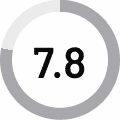
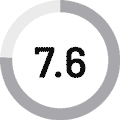
| Ratings from G2 | Gradelink SIS | Alma |
| Overall Rating |  4.7 4.7 |
 4.2 4.2 |
| Meets Requirements | 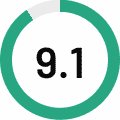 |
 |
| Ease of Use | 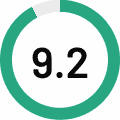 |
 |
| Ease of Setup | 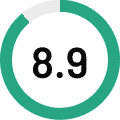 |
 |
| Ease of Admin | |
 |
| Quality of Support |  |
 |
| Good Business Partner | |
 |
| Product Direction |  |
 |
| Gradebook | |
|
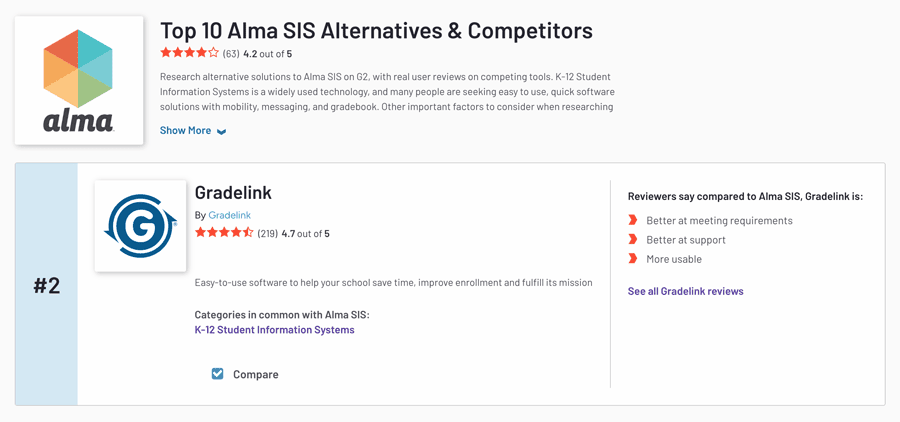
G2 ranks Gradelink as one of the top alternatives to Alma SIS.
Conclusion
Both Gradelink and Alma are capable school management systems, each with its own strengths. Alma offers an academically focused platform that works well for schools prioritizing classroom management and mobile-friendly design. It might be a good fit for schools comfortable integrating with third-party tools for functions like billing and health tracking.
Gradelink is an all-in-one solution that combines academic, administrative, and financial tools in a single platform. It offers built-in communication features, robust billing tools, medical tracking, and a top-rated mobile app to help keep families connected.
If you’d like to explore Gradelink for your school, start a free trial at gradelink.com/try-it-now.