

Is your Bible college gearing up for growth? Then it’s time to consider an all-in-one school management program like Gradelink. When you’re small, you can get away with using spreadsheets, various apps, and manual processes. But as you grow, the cracks will widen until the Bible college you love becomes an administrative nightmare.
The student’s experience is no different. As your enrollment grows, shouldn’t the students’ backend experience improve? Do you really want to ask students to use multiple apps and links to view their bills and track assignments when all-in-one solutions are out there?
Gradelink simplifies all of that. It’s an all-in-one system designed to handle admissions, class signups, communication, grades, billing, and transcripts — in one unified portal.
Here’s how Bible colleges can use Gradelink to replace scattered tools and streamline everything from enrollment to graduation.
Table of Contents
- 1. Accept Applications and Re-Enroll Students with Ease
- New Students Applications
- Returning Students Registration
- Collect Payments During Registration
- 2. Give Students a Clear View of Assignments
- 3. Centralize Communication
- 4. Automatically Generate Transcripts and Track Graduation
- 5. Promote, Graduate, and Archive with One Click
- Why This Matters
Key Takeaway
Gradelink is an essential all-in-one system for growing Bible colleges, simplifying administrative tasks by replacing scattered tools with a unified portal for students and staff. It streamlines the entire student lifecycle, covering admissions and re-enrollment, collecting payments, centralizing communication, providing clear views of assignments and grades, and automatically generating transcripts, all of which reduces errors and ensures a smooth, organized, and ministry-focused student experience.
1. Accept Applications and Re-Enroll Students with Ease
Gradelink simplifies both new student applications and returning student re-enrollment, without needing external tools or forms.
New Students Applications
The process starts when a new student clicks an application link — one you can easily embed on your website or send directly by email. From there, they’re guided through a digital form where they enter their contact information, sign required agreements (such as a statement of faith, a refund policy, or a pastor’s recommendation), and upload any necessary documents, such as a driver’s license.
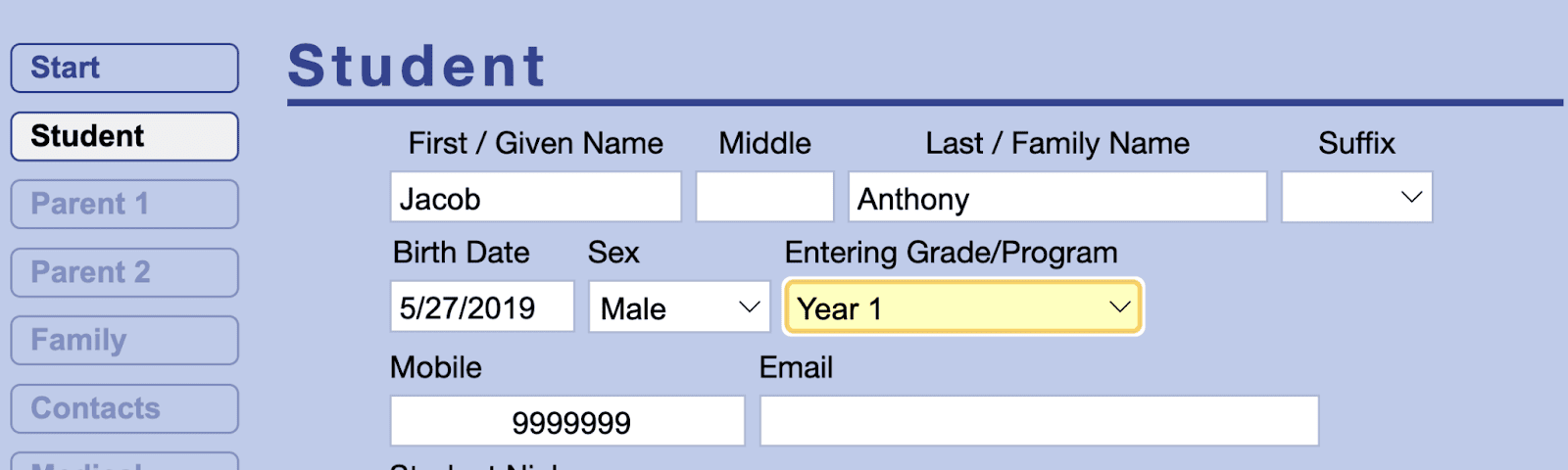
It’s important to note that students don’t enroll in individual classes “a la carte.” Instead, they apply for a specific program or year level — like “1st Year,” “2nd Year,” or whatever naming convention your Bible college uses. Once accepted, Gradelink assigns them to the full set of courses for that group. This keeps things organized and ensures they’re placed in the right track for your curriculum.
After they submit the application, your team can review and either approve or deny the student. Everything is handled within Gradelink, with no need to bounce between systems.
Returning Students Registration
We’ve all been to the doctor’s office and had to fill out the same forms before every appointment, and wondered, “Are they losing all this paperwork in a small fire every night?”
Fortunately, your students won’t have to wonder the same thing.
Returning students re-enroll through their existing student portal, where the system simply appends updates to their current record. Students are able to edit their contact info without having to retype everything from scratch each time. Students can also sign off on waivers and policies — all in one smooth, easy process.
Collect Payments During Registration
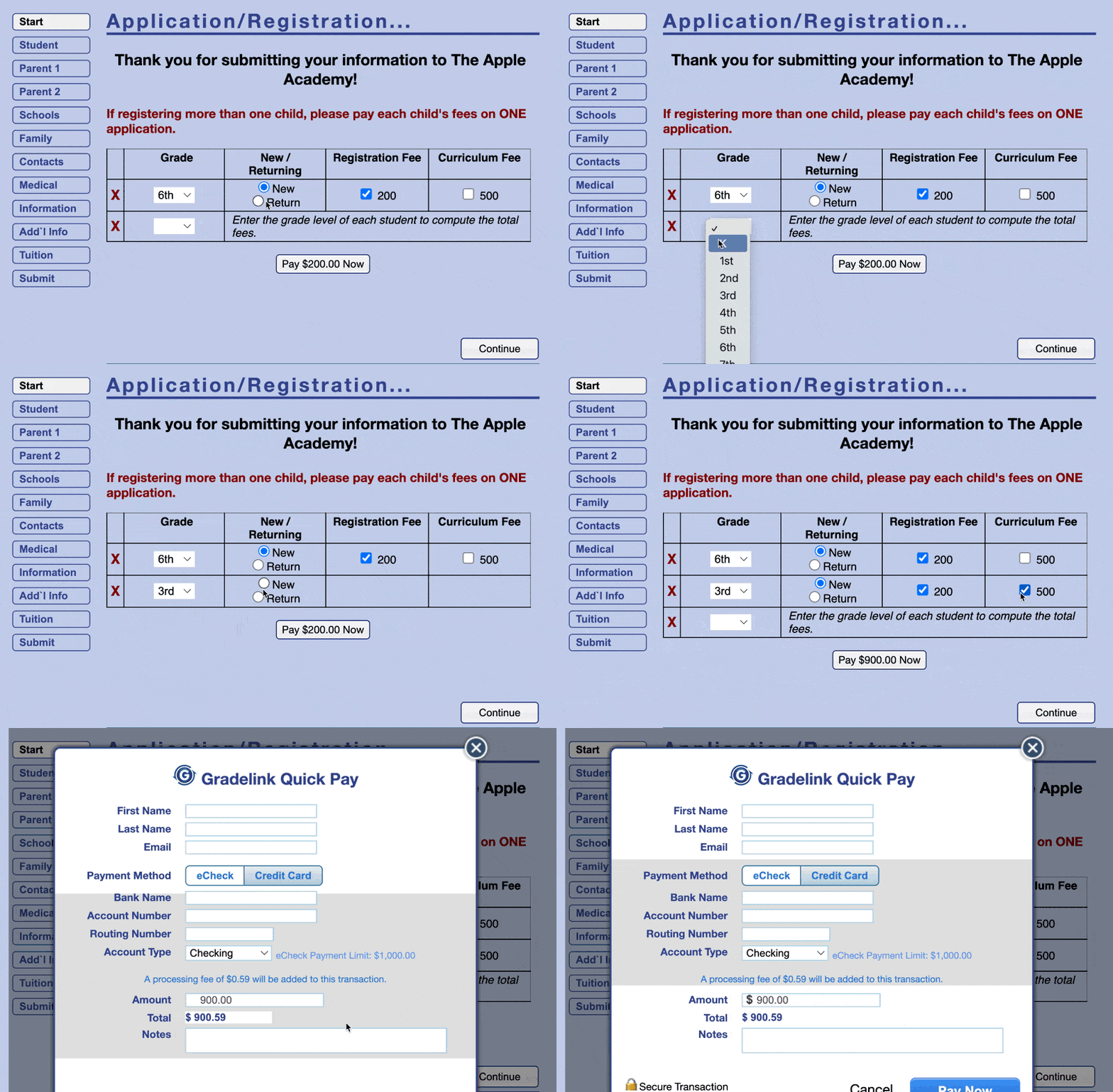
As part of both application and re-enrollment, students can submit a one-time payment. This is perfect for collecting registration fees, selling optional items like merch, and tuition paid in full.
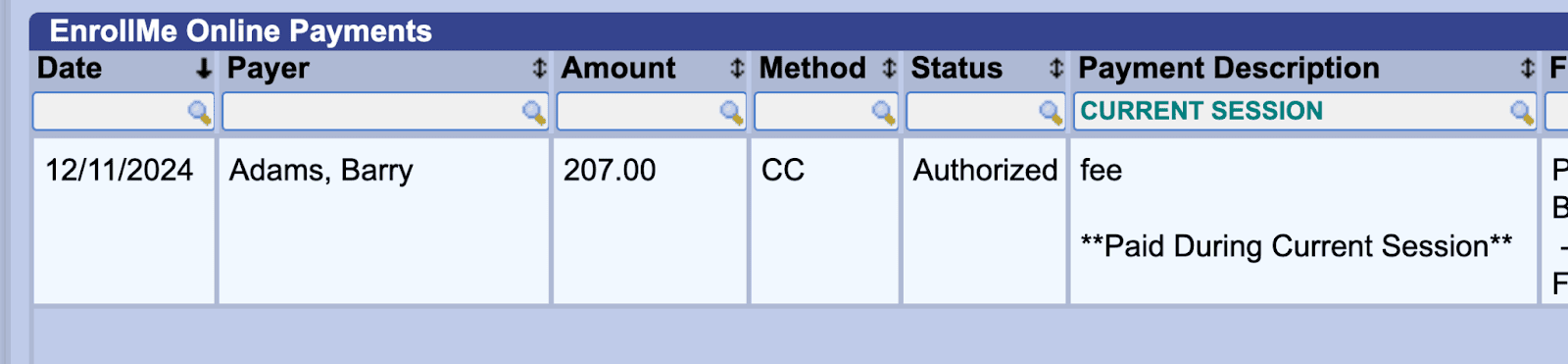
On the backend, admins will see a payment record linked to every application.
Note: If you choose to collect money outside of Gradelink (via Vemo, cash, check, etc.), you can manually track the payment in Gradelink, but it won’t show up on the application.
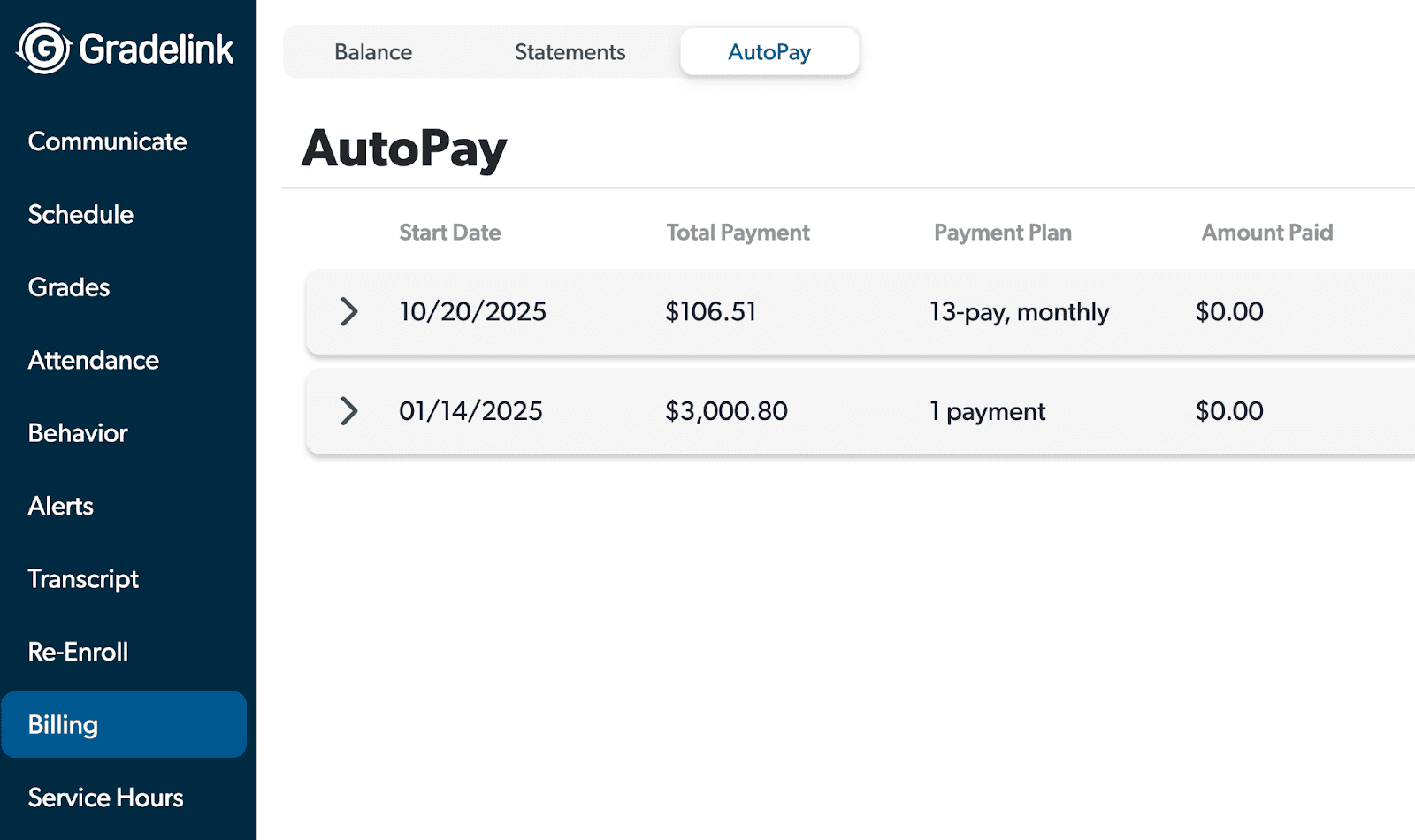
For ongoing tuition payments, Gradelink also supports payment plans. These are managed separately under the Billing section, allowing schools to set up flexible payment schedules for students. Payment plans aren’t part of the application or re-enrollment process; they’re set up after enrollment is complete.
Add Notes On Each Application
On the backend, admins can also track notes on each application, which is particularly useful if a student starts the process but doesn’t finish. You can jot down follow-up details, such as questions or concerns they’ve expressed, so you can respond with a personal touch and guide them through completing their enrollment.
2. Give Students a Clear View of Assignments
Students can easily view all their assignments right from the student portal or mobile app. The assignments are listed clearly under the “Grades” tab. By selecting “Ungraded,” students can see what’s upcoming or still needs to be submitted. Once assignments are turned in and graded, they’ll appear under the “Graded” section, making it easy to track progress and stay organized.
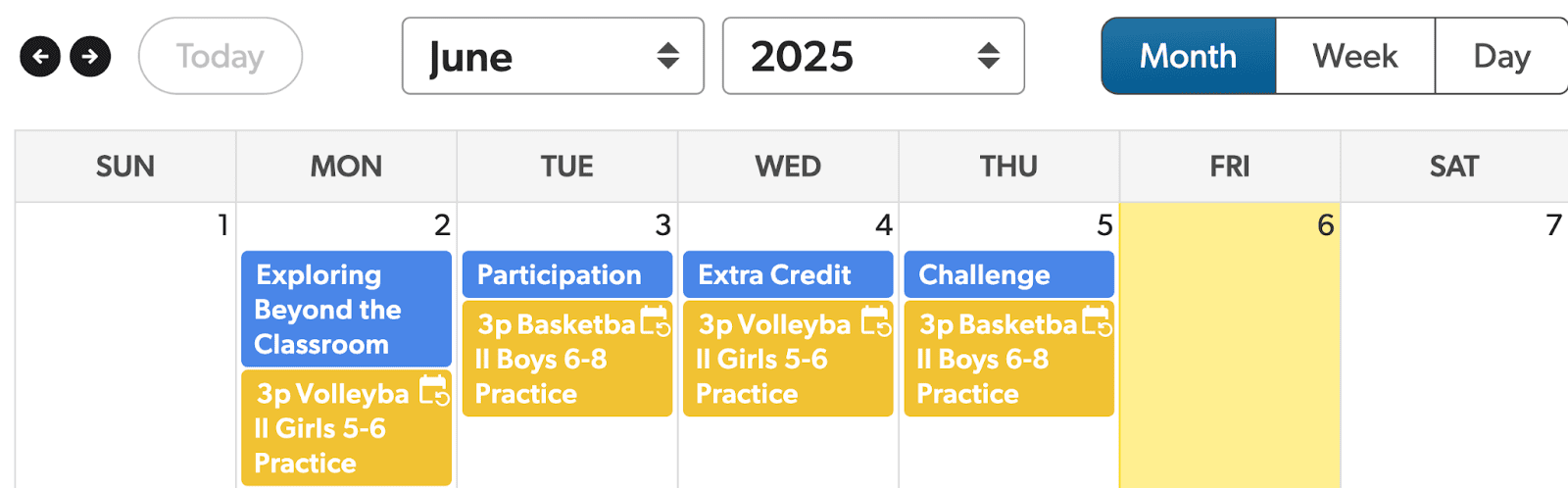
Students can also view their assignments in a calendar format. The calendar shows assignment due dates alongside other school events, giving them a complete picture of what’s coming up. In the example shown here, blue items represent assignments, but the colors are customizable to match your school’s preferences. Clicking on any assignment in the calendar reveals a detailed description, helping students know exactly what’s expected.
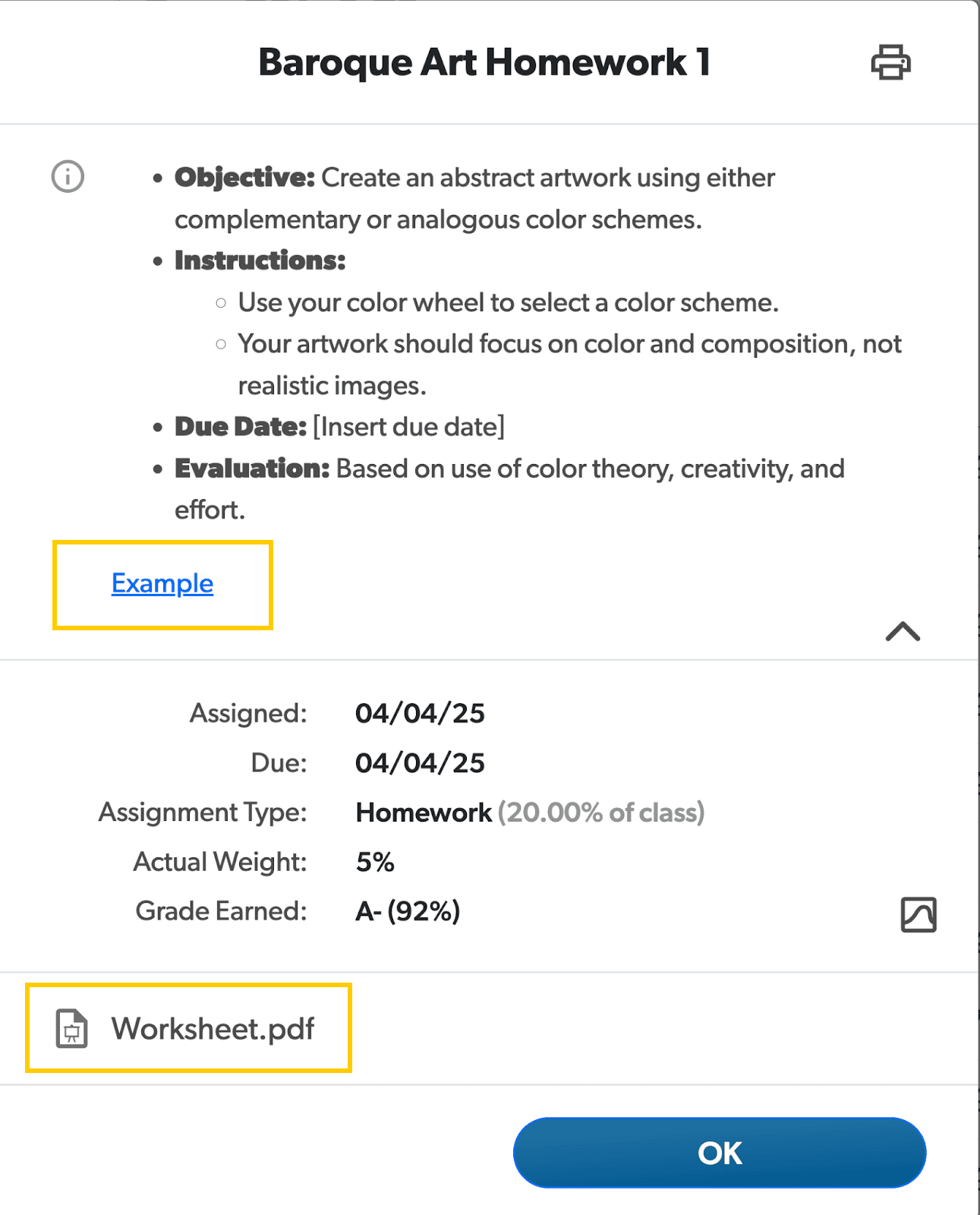
As seen highlighted above, teachers can attach links to video lectures, PDFs, and other resources directly to each assignment’s description. And for schools that want to take things further, Gradelink can integrate with Google Classroom. This connection adds powerful features like self-grading quizzes, Google Meet video sessions, class discussion forums, and the ability for students to submit essays or papers through Google Docs.
3. Centralize Communication
Gradelink makes it easy to keep students informed with announcements, messages, and meeting notes — all accessible through their student portal.

Students can view both school-wide and classroom-specific announcements as soon as they log in. These messages keep them updated on everything from schedule changes to upcoming events. The calendar in their portal also displays school-wide events, helping students stay informed of important dates and deadlines.
For more direct communication, admins can send personalized emails, text messages, or even voice messages to students. Messages can be sent to individuals, custom groups, or your entire student body — and they can be scheduled in advance to go out at just the right time.
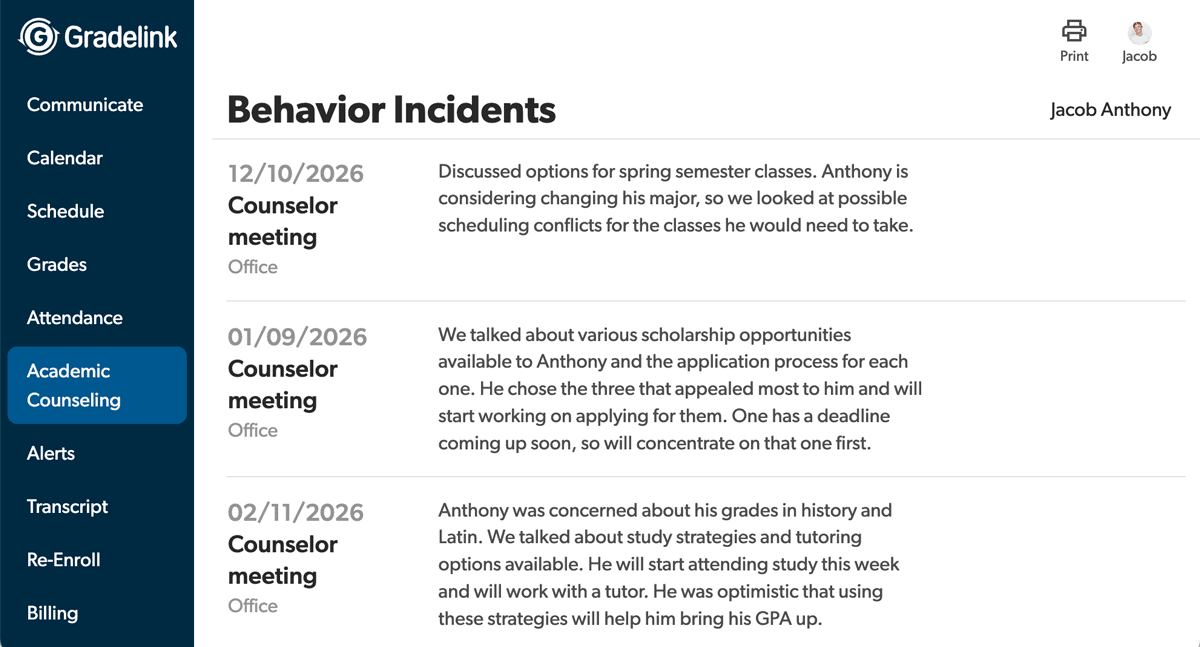
Gradelink also supports transparent academic counseling. When a staff member meets with a student, they can leave notes in the system categorized by type — such as academic counseling, career guidance, or spiritual development. These notes are visible to students within their portal, creating a record of support and helping them stay engaged with their progress.
4. Automatically Generate Transcripts and Track Graduation
Gradelink makes transcript management effortless. As final scores are entered for each class, they’re automatically added to the student’s transcript — no manual compiling needed. This saves time and ensures accuracy across the board.
Students can view an unofficial version of their transcript directly in the student portal. This version is designed to help them track their academic progress and see which classes they’ve completed. It’s clearly labeled “Unofficial Transcript” and intentionally excludes formal elements like the school’s name or contact details. Admins also have the option to show or hide the transcript in the portal, depending on your school’s preferences.
When it’s time to produce an official transcript, admins can easily generate and print it from within Gradelink. There are multiple customization options, including whether or not to display GPA, graduation date, the degree or certificate earned, and any graduation requirements. You can read more about transcript options here.
5. Promote, Graduate, and Archive with One Click
If your school runs a multi-year program, Gradelink makes it easy to promote students from one level to the next — such as moving a cohort from Year 1 to Year 2, or from freshman to sophomore. Promotions can be done in batches, saving time and ensuring consistency across your student body. You can also select specific students who should not be promoted, giving you full control over academic progression.
When students complete the program, you can mark them as “Graduated” in the system. This includes logging their official graduation date and changing their status to “Alumni.” What’s especially helpful is that Gradelink keeps alumni data permanently — at no extra cost. You can access their full records, print transcripts, run reports, and even send communications to alumni, all from the same dashboard.
In fact, Gradelink lets you run reports on every student in your system, whether they’re currently enrolled or have already graduated, giving you a comprehensive view of your school’s academic history whenever you need it.
Why This Matters
Gradelink doesn’t just save time. It reduces errors, simplifies communication, and gives students a smoother experience. And for Bible colleges that want to stay organized, presentable, and ministry-minded — that matters.
Ready to cut the clutter and simplify your school admin? Gradelink gives you the structure and tools to support your students and staff — all in one place.
Frequently Asked Questions (FAQs)
Why should a growing Bible college consider using Gradelink?
When a Bible college gets bigger, juggling spreadsheets and scattered tools just slows everyone down. Things slip through the cracks, and the paperwork piles up quickly. Gradelink brings everything together: admissions, class registration, communication, grades, billing, transcripts, and more, so you don’t have to chase details across a dozen places. It streamlines the whole process and gives you one simple portal to handle it all.
What parts of the student lifecycle does Gradelink simplify?
Honestly, Gradelink covers pretty much everything. Gradelink handles admissions and re-enrollment, makes collecting payments easy, keeps all your communication in one spot, gives students and staff a clear view of assignments and grades, and even takes care of transcripts automatically. It’s built to keep the entire student journey smooth from start to finish.
How does Gradelink help with new student applications?
New students don’t pick classes one by one. Instead, they apply for a program or a specific year, like “1st Year.” Once they get in, Gradelink takes care of the rest and automatically enrolls them in all the right courses for that group. That way, everyone lands on the right curriculum track from day one.
How does the application process handle course enrollment for new students?
New students don’t enroll in individual classes a la carte. They apply for a specific program or year level (e.g., “1st Year”), and once accepted, Gradelink automatically assigns them to the full set of courses for that group to ensure they are placed on the right curriculum track.